Barcode Scanner Setup for Erply, Directo and Loyverse
A scanner arrives, you plug it in, and the till field fills with the wrong characters. Or nothing arrives at all, because the software was listening on a COM port while the scanner was busy pretending to be a keyboard. Nearly every failed barcode scanner setup we get called about comes down to three settings: which interface the scanner presents to the computer, which keyboard layout it thinks it is typing on, and what it sends at the end of a scan. Fix those three and Erply, Directo, Merit Aktiva, Standard Books, SmartAccounts, Loyverse, Visma Horizon, Tildes Jumis, Rivile or B1.lt will all take the scan on the first attempt.
Barcode scanner setup at a glance
Find your situation, apply the setting, order the matching hardware.
| Your situation | Set the scanner to | Order this |
|---|---|---|
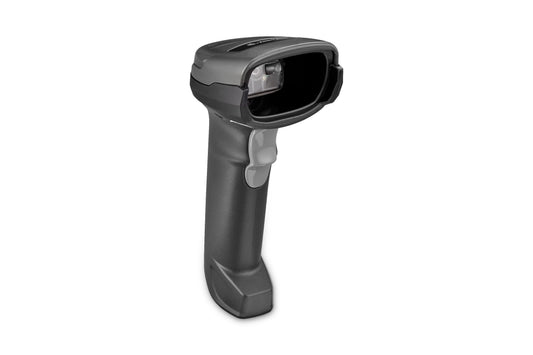
| Browser based POS or ERP on a Windows PC (Erply, Directo, Merit Aktiva, SmartAccounts, B1.lt) | USB HID keyboard, country layout matching the PC, carriage return suffix | Zebra DS2208 (DS2208-SR7U2100AZW) |
| Desktop accounting or stock software with its own scan window (Standard Books, Visma Horizon, Tildes Jumis, Rivile) | USB HID keyboard, carriage return or tab suffix | Newland HR11 Aringa (NLS-HR1150P-30) if the codes are 1D only |
| Android tablet till, Loyverse and similar | Bluetooth HID, or USB HID through an OTG cable | Zebra DS2278 (DS2278-SR00007ZZWW) |
| Fixed counter position, grocery or pharmacy throughput | USB HID, presentation mode, continuous scan | Zebra DS9308 (DS9308-SR4U2100AZE) |
| Stock counts and goods receipt away from the PC | Bluetooth HID, batch memory for out of range scanning | Datalogic QuickScan QBT2131 (QBT2131-BK-BTK1) |
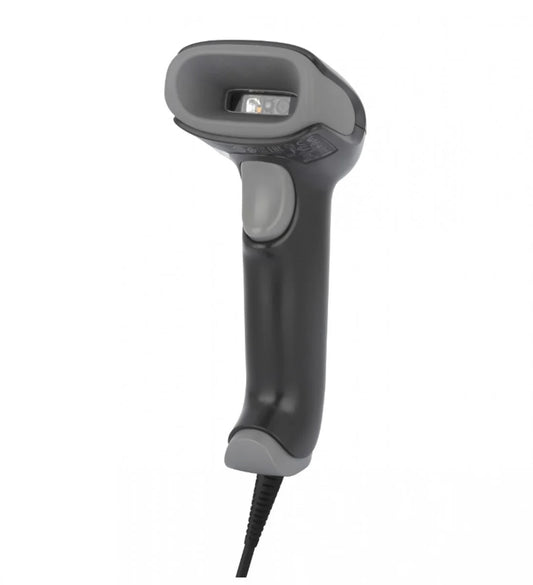
| Older till, scale or controller expecting a serial port | USB COM (virtual COM port) or true RS-232 | Honeywell Xenon 1952g (1952GSR-2USB-5-R) |
Which interface does your software actually want?
Most scanners can present themselves to the computer in several ways. Pick the wrong one and the hardware is faultless while nothing works.
| Mode | What the computer sees | Driver needed | Main risk |
|---|---|---|---|
| USB HID keyboard (keyboard wedge) | A second keyboard | No | Scan lands in whichever field has focus |
| USB COM (virtual COM port) | A serial port over USB | Yes, vendor CDC driver | Port number changes if you move the cable to another socket |
| RS-232 | A true serial port | No, but needs a powered scanner cable | Generic serial cables do not carry the power the scanner expects |
| Bluetooth HID | A wireless keyboard | No | Pairing can be stolen by a phone |
| Bluetooth SPP | A serial port over Bluetooth | Usually yes | Application must open the port itself |
Keyboard wedge is the right answer for roughly nine installations out of ten, and it is how almost every scanner ships from the factory. The scan lands wherever the cursor is, no integration work required. The trade off is that the software cannot tell a scan apart from fast typing, and a cursor in the wrong box means the barcode goes into the wrong field.
USB COM is worth the extra driver when the application was written for serial scanners, or when you want scanned data kept separate from the keyboard so that a member of staff typing cannot corrupt it. Older Baltic warehouse, weighing and production systems still expect this.
Why does the scanner type the wrong characters?
This is the most common fault in Estonian, Latvian, Lithuanian and Finnish installations, and it only shows up on some barcodes, which is why it takes weeks to diagnose.
A keyboard wedge scanner does not send text. It sends key codes, exactly as if someone had pressed those keys. Windows then turns key codes into characters using the layout selected on that PC. Every major scanner ships set to US English. If the PC is set to Estonian, Finnish, Latvian or Lithuanian, letters and digits usually survive but punctuation does not: a hyphen becomes a plus, a slash becomes a minus, an underscore disappears. Plain EAN-13 retail barcodes are all digits, so the till looks perfect for weeks. The first Code 128 serial number or GS1-128 pallet label containing punctuation then fails, and everyone blames the label.
There are two fixes, and only one of them scales.
The direct fix is to set the scanner's country keyboard type to match the PC. Zebra calls the parameter Country Keyboard Type, Honeywell calls it Country Code, and both are set by scanning one barcode from the programming guide or by pushing a configuration file from the vendor tool. Correct, and the right choice for a permanent counter PC.
The fix that scales is ALT mode, listed by various makers as Alt key emulation or emulate keypad. The scanner then sends each character as its numeric code rather than as a key position, so the output is identical no matter which layout Windows is using. Use this across a fleet of machines whose layouts you do not control, and on remote desktop or thin client sessions. It costs a few milliseconds per character, which only shows on very long barcodes.
What should the scanner send at the end of a scan?
By default most scanners append a carriage return, which the software reads as Enter. Usually that is what you want: the code lands in the field and the form submits. Three situations call for something else.
- Multi field forms. If the operator should move to the next box rather than submit, set a tab suffix instead of carriage return.
- Software that watches keystroke timing. Erply's point of sale exposes exactly this: an average time between two characters, a wait after the last keypress before it starts searching, and a minimum barcode length. If scans are being cut in half, or two scans merge into one, those three numbers are where you look, not the scanner.
- Browser tills where Enter triggers something unrelated. Send no suffix and let the application's own input handler pick the scan up.
One more setting earns its keep on remote desktop: a small inter character delay, typically 5 to 10 milliseconds. Terminal server sessions over a slow link drop characters, and this is the cure.
How do you get GS1 DataMatrix into accounting software?
GS1 DataMatrix and GS1-128 pack several fields into one barcode, separated by a group separator, ASCII 29, which no keyboard can type. In keyboard wedge mode that character often arrives as nothing at all, so the batch number runs straight into the expiry date and the software stores rubbish.
Scanners solve this with a substitution setting. On Zebra it is USB Keyboard FN1 Substitution: you enable it and define the key sequence to send in place of the separator, commonly a tab or a control character that the receiving application is set to split on. Honeywell does the same job through data formatting rules in EZConfig. The method is the same either way: agree with your software supplier which character they want to see, configure the scanner to send that, then test with a real label rather than a printed sample.
This matters more every year. Pharmacy verification, tobacco track and trace and the wider move to 2D codes at the till all put GS1 DataMatrix in front of staff who previously only scanned EAN-13. Any 2D imager reads the symbol. Whether the data lands in the right fields is a configuration question, not a hardware one. Zebra documents the parameter in its USB keyboard FN1 substitution guide.
What changes when the scanner goes cordless?
Two extra decisions. The first is HID or SPP, the same choice as on USB. For a Windows till, Bluetooth HID is almost always right. For an Android tablet running Loyverse, HID is the only sensible answer: Loyverse for Android accepts any scanner using the HID protocol, over Bluetooth or over USB with an OTG cable. On iOS the list is far narrower because Apple restricts what a POS app may talk to, so check the software vendor's supported models before buying rather than after.
The second is cradle or direct pairing. A scanner paired to its own charging cradle, such as the DS2278, the Xenon 1952g or the QuickScan QBT2131, reconnects on its own when lifted, charges in the same place and survives a change of staff. A scanner paired straight to a tablet is cheaper to set up and more fragile: someone pairs their phone, the tablet forgets the scanner, and you get the support call.
If stock counts happen out of Bluetooth range, look for batch or memory mode, where the scanner stores scans and uploads them on return to the cradle. Once the job needs the operator to see stock levels while walking, you have outgrown scanners and want a handheld mobile computer instead.
How do you configure twenty scanners without scanning forty barcodes each?
Scanning configuration barcodes one at a time is fine for one scanner and unacceptable for twenty. Every serious manufacturer ships a free Windows tool that reads the current settings out of a scanner over USB, lets you change them in a normal interface, and writes them back: Zebra 123Scan, Honeywell EZConfig for Scanning, Datalogic Aladdin. Newland scanners are programmed from the configuration barcodes in the product user guide.
Save the finished configuration as a file and print it as a single configuration barcode sheet. A new shop is then set up by scanning one sheet, and a replacement scanner is back to your standard in ten seconds. It is also the fastest diagnosis when a scanner starts behaving oddly: read the settings out, compare them against your saved profile, and you will usually find that someone scanned the factory reset barcode printed on the back of the box.
Common questions
Does the scanner need a driver?
Not in USB HID keyboard mode, which is how most ship. USB COM mode needs the vendor CDC driver on Windows. Bluetooth HID needs nothing beyond pairing.
Will a cheap 1D scanner work with my system?
For EAN-13 retail scanning, yes. The Newland HR11 Aringa reads every 1D symbology a shop will meet. It cannot read QR codes, GS1 DataMatrix or a code shown on a phone screen, which is where the saving is later spent.
Can one scanner serve two applications at once?
In keyboard wedge mode the scan goes to whichever window has focus, so one at a time only. If two applications genuinely need the same scans, use USB COM mode and middleware that distributes the data.
Why does the same scanner work on one PC and not another?
Almost always because the two machines have different Windows keyboard layouts while the scanner is set to a fixed country code. Switch the scanner to ALT mode and the difference disappears.
Can a scanner read a barcode from a phone screen?
Only a 2D imager can. Laser scanners do not read screens reliably. If you accept mobile loyalty cards, e-tickets or digital receipts, buy an imager.
How long should a counter scanner last?
Five to seven years is normal for the models above. Cables and stands fail long before the scanner does, which is why we stock them separately.
Choosing the hardware once the settings are clear
Pick the interface first and the model second. If the software runs in a browser on a Windows till, a corded USB HID scanner from our handheld barcode scanner range is the whole answer, and it costs less than an hour of integration work. If staff move around the counter, a cordless scanner with a charging cradle is worth the extra outlay. Order the correct cable and stand at the same time from barcode scanner accessories, because a scanner lying flat on a counter without a stand is the second most common reason shops replace hardware that was never broken.
Tags:
Previous
Thermal Label Materials: Which Roll to Order for Each Job
Next
Label Printer Setup for Erply, Directo and Baltic ERPs