Comparison
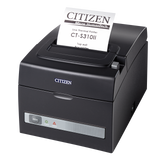
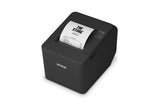
Citizen CT-S310II vs Epson TM-T20IV: which receipt printer?
The TM-T20IV prints faster at 250 mm/s. The CT-S310II has a built-in power supply and buzzer, full and partial cuts, and no Epson-style ban on going back from 58 to 80 mm.
In this guide
Both are 80 mm direct thermal receipt printers at 203 dpi with an autocutter, USB and serial ports, a 24 V cash drawer port and a 58 mm option. The main differences in our versions: the Epson TM-T20IV (C31CL47101) prints faster, at 250 mm/s instead of 160 mm/s, while the Citizen CT-S310II (CTS310IIEBK) has its power supply and buzzer built in, can also make a full cut and is a little smaller.
| Citizen CT-S310II (CTS310IIEBK) | Epson TM-T20IV (C31CL47101) | |
|---|---|---|
| Interfaces | USB, RS-232 serial | USB, RS-232 serial |
| Serial connector | 9-pin | 25-pin |
| Ethernet | No (separate ET model) | No (separate USB + Serial + Ethernet model) |
| Max print speed | 160 mm/s | 250 mm/s |
| Print resolution | 203 dpi | 203 dpi |
| Characters per line (Font A, 80 mm) | 48 | 48 |
| Print width (80 mm paper) | 72 mm | 72 mm |
| Paper width | 80 mm; 58 mm with the included partition | 80 mm; 58 mm with the included guide |
| Back to 80 mm after using 58 mm | Remove the partition; Citizen gives no warning against it | No, Epson says the change is permanent |
| Max roll diameter | 83 mm | 83 mm |
| Paper thickness | 65–75 µm (12 mm core), 75–85 µm (25.4 mm core) | 53–75 µm |
| Paper sensors | Paper end | Paper end, paper near-end (off by default) |
| Autocutter | Full and partial cut | Partial cut |
| Autocutter life | 2 million cuts | 2 million cuts |
| Power supply | Built in, AC cord only | External AC adapter |
| Buzzer | Built in | Optional external buzzer on the drawer port |
| Status lights | POWER, ERROR | Power, Error, Paper |
| Cash drawer | 24 V, two drawer outputs | 24 V, two drawer outputs |
| Size (W × D × H) | 140 × 195 × 132 mm | 146 × 199 × 146 mm |
| Weight | About 1.9 kg | 1.7 kg |
| Operating temperature | 5–45 °C | 5–45 °C |
| Command system | ESC/POS | ESC/POS |
| Windows driver | Citizen Windows Driver, OPOS, JavaPOS, POS for .NET | EPSON Advanced Printer Driver 6, OPOS ADK, JavaPOS ADK |
| Mounting parts in the box | Rubber feet, wall-mounting bracket kit | Rubber feet, wall bracket |
Figures from Citizen's data sheet and user manual and Epson's technical reference guide. Speeds are maximums.
Choose the CT-S310II if
- You want fewer cables on the counter: there is no external power adapter
- You want a built-in buzzer that sounds on errors, without giving up the drawer port
- You need full cuts, with the printer upright or on a wall
- You may want to go back from 58 mm to 80 mm paper later: Citizen gives no warning against it, Epson does
- Your POS software or cables already use a 9-pin serial connection
Choose the TM-T20IV if
- You print long receipts or many receipts at busy times and want 250 mm/s
- You want a warning before the roll runs out (near-end sensor)
- Your POS software lists Epson printers or uses the Epson Advanced Printer Driver
- You already have Epson printers and want one set of drivers and spare parts
What the two printers share
Both print 48 characters per line at 203 dpi on standard 80 mm thermal rolls up to 83 mm in diameter, with a 72 mm print width. Both use ESC/POS commands, so most POS programs can drive either one. Both have USB and RS-232 serial ports, with Ethernet only on separate models, and both drive a 24 V cash drawer. Both can stand flat, upright or on a wall with the parts in the box, and both work between 5 and 45 °C.
Where they really differ
Speed
The TM-T20IV prints up to 250 mm/s, the CT-S310II up to 160 mm/s. For a short shop receipt the difference is small. In a busy restaurant or with long receipts the Epson finishes noticeably sooner.
Power, buzzer and cutting
The CT-S310II needs only an AC cord, because the power supply is inside. The TM-T20IV uses an external adapter. The Citizen has a buzzer for errors built in; on the Epson the buzzer is an optional extra that uses the drawer port, so you can't use it together with a cash drawer. The Citizen can cut fully or partially, the Epson cuts partially. Citizen advises against full cuts when the printer stands flat, because they can jam the cutter.
58 mm paper
Both take 58 mm rolls with a part from the box. Epson says that once you print on 58 mm paper you cannot go back to 80 mm. Citizen's manual only says to remove the partition for 80 mm rolls and gives no such warning, so the CT-S310II suits shops that are not sure which width they will keep.
Setup help: CT-S310II setup guide and TM-T20IV setup guide. All guides: CT-S310II and TM-T20IV.
Frequently asked questions
Which is faster, the Citizen CT-S310II or the Epson TM-T20IV?
The Epson TM-T20IV, at up to 250 mm/s. The CT-S310II prints at up to 160 mm/s.
Do both printers use the same paper?
Yes. Both take 80 mm thermal rolls up to 83 mm in diameter, or 58 mm rolls after fitting the part from the box.
Can I use the same cash drawer with both?
Yes, if it is a printer-driven 24 V drawer with the matching drawer cable. Set when the drawer opens in your POS software or driver.
Can either printer connect to a network?
Not our versions, which have USB and serial. Citizen and Epson both sell Ethernet versions under separate part numbers.
Was this guide helpful?
More CT S310II guides
Related guides
Still stuck?
Contact support
Send us your model and a short description of the problem. Our team will help you find a solution.