Comparison
Epson TM-m30III vs TM-T20IV: which receipt printer to choose
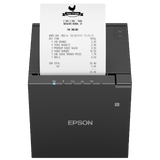
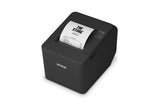
The TM-m30III is the compact, faster choice for tablets and networks. The TM-T20IV USB + Serial suits a PC till or a POS system that needs a serial port.
In this guide
Both are 80 mm thermal receipt printers with 203 dpi print quality and an autocutter. The TM-m30III is the compact, faster model built for tablets and networks. The TM-T20IV in our USB + Serial version is a classic PC printer for a fixed till, including older POS systems that use a serial port. This comparison covers our two part numbers, C31CK50112 and C31CL47101.
| TM-m30III (C31CK50112) | TM-T20IV (C31CL47101) | |
|---|---|---|
| Interfaces | USB-B, USB-C (USB-PD), USB-A for accessories, Ethernet | USB, RS-232 serial |
| Ethernet | Yes | No (separate USB + Serial + Ethernet model) |
| Wi-Fi | Optional, with the OT-WL06 unit | No |
| Bluetooth | No (separate Wi-Fi + Bluetooth model) | No |
| Tablet connection | USB-C with charging up to 18 W, network tethering | No |
| Max print speed | 300 mm/s | 250 mm/s |
| Print resolution | 203 × 203 dpi | 203 × 203 dpi |
| Paper width | 80 mm; 58 mm with the included guides | 80 mm; 58 mm with the included guide |
| Max roll diameter | 83 mm | 83 mm |
| Paper thickness | 48–80 µm | 53–75 µm |
| Autocutter | Partial or full cut, selectable | Partial cut |
| Autocutter life | 2.2 million cuts (partial), 1.5 million (full) | 2 million cuts |
| Paper exit and mounting | Top or front (by refitting covers); wall with optional OT-WH30 bracket | Top (horizontal) or front (vertical); wall bracket included |
| Size (W × D × H) | 127 × 127 × 130 mm | 146 × 199 × 146 mm |
| Weight | 1.3 kg | 1.7 kg |
| Noise when printing | Approx. 53 dB | Approx. 55 dB |
| Mechanism life / MCBF | 17 million lines / 65 million lines | 15 million lines / 60 million lines |
| Cash drawer | Drawer kick connector, 24 V | Drawer kick connector, 24 V |
| Operating temperature | 5–45 °C | 5–45 °C |
| EU network security rules | In scope: unique admin password, Secure Printing | Not in scope for the USB + Serial model |
Figures from Epson's technical reference guides and product pages. Speeds are maximums.
Choose the TM-m30III if
- Your POS runs on an iPad or Android tablet and you want a cable that also charges it
- You want to print over your network, now or later with Wi-Fi
- Counter space is tight
- You want front paper exit under a counter, or full-cut receipts
- You print long queues and want the extra speed
Choose the TM-T20IV if
- Your till is a Windows PC and the printer connects by USB
- Your POS system needs an RS-232 serial printer
- You want a wall bracket in the box
- You don't need a network, Wi-Fi or tablet connection
What the two printers share
Both print at 203 dpi on 80 mm thermal rolls up to 83 mm in diameter, and both can switch to 58 mm paper with the included guides. That switch is one-way on both printers: once you have printed on 58 mm paper, Epson says you can't go back to 80 mm. Our 58 mm paper guide covers both models.
Each has a drawer kick connector for a 24 V cash drawer, and both work with the Epson Advanced Printer Driver 6 on Windows. See Install the Epson receipt printer driver on Windows and the cash drawer guide.
Where they really differ
Tablets and networks
The TM-m30III is designed for tablet POS. Its USB-C port charges an iPad or Android tablet with up to 18 W while it carries the print data, and with network tethering the tablet can use the printer's wired network connection. Ethernet is built in, and Wi-Fi can be added with the OT-WL06 unit. The TM-T20IV C31CL47101 has USB and serial only, so it is meant for a PC. For tablet POS with Loyverse, see our Loyverse setup guide.
Network security in the EU
TM-m30III printers sold in the EU from 2025 fall under the Radio Equipment Directive cybersecurity rules ("Security Mode: RED" on the status sheet). Each has its own administrator password, and by default it only accepts encrypted print jobs over a network, from compatible software. The USB + Serial TM-T20IV is outside these rules. Over USB, both behave the same.
Size and installation
The TM-m30III is a 127 mm cube of 1.3 kg. You choose top or front paper exit by refitting its covers, and a wall bracket is optional. The TM-T20IV is larger and heavier; it stands horizontally or vertically, and its wall bracket comes in the box.
More help: TM-m30III guides and TM-T20IV guides.
Frequently asked questions
Which is faster, the TM-m30III or the TM-T20IV?
The TM-m30III prints at up to 300 mm/s, the TM-T20IV at up to 250 mm/s.
Can the TM-T20IV connect to a tablet?
Our TM-T20IV C31CL47101 has USB and serial ports and no network or wireless connection, so it is meant for a PC. For tablet POS, choose the TM-m30III.
Do both printers use the same paper?
Yes, 80 mm thermal rolls up to 83 mm in diameter, or 58 mm rolls after fitting the guides. Paper thickness ranges differ slightly: 48–80 µm for the TM-m30III and 53–75 µm for the TM-T20IV.
Do they work with the same cash drawer?
Both have a drawer kick connector that drives a 24 V cash drawer, so the same printer-driven drawer can be used with either.
Was this guide helpful?
More Epson TM-m30III guides
TM M30III
How-toConnect the Epson TM-m30III to Wi-Fi or Bluetooth15 min · Medium
TM M30III
TroubleshootingEpson TM-m30III troubleshooting: lights, errors and fixes10 min · Easy
TM M30III
SetupEpson TM-m30III setup guide: from unboxing to first receipt15 min · Easy
TM M30III
How-toConnect an Epson receipt printer to Loyverse POS20 min · Medium
TM M30III
How-toInstall the Epson receipt printer driver (APD6) on Windows15 min · Easy
TM M30III
How-toConnect a cash drawer to an Epson receipt printer10 min · Easy
Still stuck?
Contact support
Send us your model and a short description of the problem. Our team will help you find a solution.