How-to
RAM Tough-Tray vehicle laptop mount for Toughbook and Getac
Match your rugged laptop to the right RAM Tough-Tray, choose a no-drill or drill-down vehicle base, install it clear of airbags and the driver's view, and power the laptop safely.
In this guide
A laptop mount for vehicles keeps a rugged laptop such as a Panasonic TOUGHBOOK 55 or a Getac B360 secure and within reach in patrol and service vehicles. SCANSHOP is an official RAM Mounts reseller; see also our RAM Mounts guide for military and defence vehicles.

Before you start
You'll need
- The laptop's dimensions and weight, with any handle or case fitted
- The vehicle maker's airbag information
- A socket wrench or a drill, depending on the base
- A vehicle power adapter approved by the laptop maker
Important
RAM's vehicle-mount instructions state: “Do not install this product near or over an airbag deployment area or in a location that obstructs the driver’s vision or interferes with vehicle operation.” Follow the vehicle maker's and RAM's instructions, and leave hardwiring to a qualified installer.
Which laptop fits which Tough-Tray
A Tough-Tray is spring-loaded: it expands to the laptop's width, and adjustable side arms clamp the sides. Every version bolts to RAM mounts through the 4-hole AMPS pattern. RAM's sizes (mm are our conversion):
| Tough-Tray (RAM-234-3, -3FL) | Tough-Tray III (RAM-234-7) | |
|---|---|---|
| Laptop width | 10"–16" (≈254–406 mm) | 10"–15.25" (≈254–387 mm) |
| Laptop thickness (clamp height) | 0.5"–1.75" (≈13–44 mm) | 0"–1.875" (≈0–48 mm) |
| Laptop depth | No limit given; tray 10" deep | 7.625"–10.625" (≈194–270 mm) |
Rugged laptops, makers' figures:
| Laptop | W × D × H | Tough-Tray | Tough-Tray III |
|---|---|---|---|
| Panasonic TOUGHBOOK 55 (mk3) | 345 × 272 × 32.8 mm | Width, height in range | Depth 2 mm over |
| Getac B360 | 342 × 281 × 34.9 mm | Width, height in range | Depth over |
| Getac S410 | 350 × 293 × 38.5 mm | Width, height in range | Depth over |
These laptops are within the original Tough-Tray's width and thickness ranges; RAM gives no depth limit for it, so test-fit one first. The Tough-Tray III suits laptops up to about 270 mm deep that you want locked in.
Recommended RAM Tough-Tray laptop trays

RAM MOUNTRAM Mounts Tough-Tray Spring-Loaded Laptop Holder with Angled Arms, 10"–16" WidePart no. RAM-234-3
99,29 €+VATIn stock

RAM MOUNTRAM Mounts Tough-Tray III Locking Spring-Loaded Laptop Tray for Laptops up to 17"Part no. RAM-234-7
150,71 €+VATIn stock
Buying for a fleet or a tender? Ask us for a quote.
Get a quote- Tough-Tray RAM-234-3: widest width range, covers all three laptops above.
- Tough-Tray III RAM-234-7: slimmer, with a key lock.
- Options: RAM-234-3FL flat arms let the lid close; the RAM-234-S2U screen support keeps the screen in position.
Choose the vehicle laptop mount base
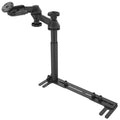
No-drill: the RAM-VB-196-SW2 No-Drill Universal Vehicle Floor Mount anchors on the passenger seat's front seat-leg bolts. A telescoping pole sets the height, and double swing arms give 12" (≈305 mm) of reach for passenger and driver. It has the same base and pole as RAM's laptop mount RAM-VB-196-SW1, now labelled "Legacy"; add a RAM-234-3 Tough-Tray for the same parts list.
Check
RAM lists the vehicles in which it has tested and confirmed this base and recommends it primarily for left-hand-drive vehicles. Check other vehicles with RAM's compatibility guide (seat-leg bolts 9"–18.875" apart; not for seats held by hooks instead of bolts, such as GM front seat-leg hooks). Some installations limit seat adjustment or need drilling. Test-fit one vehicle first.
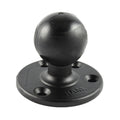
Drill-down: on a console or bulkhead, use D-size parts, which RAM lists for "Rugged tablets, laptops, and heavy equipment": a RAM-D-202U round base (reinforced: RAM-D-202U-IN1), the short RAM-D-201U-C arm and the steel-reinforced RAM-D-254U-IN1 AMPS plate under the tray.
Tip
RAM's size guide gives about 4 lb (≈1.8 kg) for C size and 6 lb (≈2.7 kg) for D: "Approximate capacity for a standard ball with a mid-length arm. Shorter arms and steel-reinforced posts increase real-world capacity." For heavier devices, RAM recommends the next ball size up or a steel-reinforced post. Send us your laptop model, configuration and vehicle, and SCANSHOP will confirm the right RAM build. More in our guide to RAM ball sizes.
Recommended RAM vehicle bases and arms for laptop trays

RAM MOUNTRAM Mounts No-Drill Universal Vehicle Floor Mount with Dual Swing Arms and Round Plate, C-SizePart no. RAM-VB-196-SW2
338,39 €+VATAvailable on request


RAM MOUNTRAM Mounts Round AMPS Plate with Ball and Steel-Reinforced Post, D-SizePart no. RAM-D-254U-IN1
49,53 €+VATAvailable on request
Buying for a fleet or a tender? Ask us for a quote.
Get a quote
Plan the position in the vehicle
- Keep every part clear of all airbag areas (wheel, dashboard, knee, side, curtain) as the arms swing.
- Keep the driver's view and mirrors clear.
- Keep pedals, controls and seat-belt buckles free.
Install the vehicle base
No-drill base, per RAM's sheet:
- Move the passenger seat to its rear-most position.
- Remove or loosen the front seat-leg bolts.
- Place the base under the front seat-frame legs (RAM also shows spacer options).
- Use the supplied bolts only if the thread matches the factory bolts.
- Fully tighten the hardware; RAM gives no torque, so use the vehicle maker's seat-bolt figure.
- Fit the pole and set its height with the top knob.
Seat bolts are safety-critical: have the job done or checked by a qualified installer. Before drilling for a drill-down base, check for wiring, lines and airbag parts behind the panel.
RAM's video shows a vehicle-specific No-Drill base fixed with the same seat bolts.
Video: RAM Mounts
Assemble the Tough-Tray and load the laptop
Fit the side arms as RAM's instructions show and bolt the tray to the mount's round plate through the AMPS holes. On a ball mount, tighten the arm knob firmly; in frost, RAM's Hi-Torq wrench helps with D-size knobs. Centre the laptop, let the springs close the tray and set the side arms clear of ports, vents and battery latches. Lock the Tough-Tray III and keep the spare key separately.
Video: RAM Mounts
Power the laptop
Use the laptop maker's vehicle adapter or dock. RAM's GDS USB-C hardwire chargers (5–15 V, 3 A max, 45 W) are made for GDS vehicle solutions, below these laptops' own adapters (TOUGHBOOK 55: 15.6 V, 7.05 A; Getac: 90 W). Getac offers a 120 W DC-DC vehicle adapter (11–32 VDC) for the B360 and S410; for the TOUGHBOOK 55, check Panasonic's accessories.
Have a qualified installer hardwire and fuse the circuit as the adapter maker specifies, with cables clear of airbag zones, pedals and seat rails. Tablet power is covered in our guide to RAM GDS hardwire chargers for 12 V and 24 V vehicles.
Test and re-check
Swing the arms through their full range: nothing may reach an airbag zone or the driver's view, and the seat must still adjust and lock. After a rough test drive, re-check every bolt and knob. For laptop setup, see our TOUGHBOOK 55 and G2 setup guide.
Common mistakes
- Ordering the Tough-Tray III for a laptop deeper than 270 mm.
- Buying a VESA plate: RAM lists 4-hole AMPS for the tray; use an AMPS plate such as the RAM-D-254U.
- Choosing a ball size without checking the laptop's weight against RAM's size guide.
- Powering the laptop from a 45 W USB-C charger or an unfused cable.
Frequently asked questions
What is the best vehicle mount for a Toughbook 55?
A RAM-234-3 Tough-Tray on a no-drill seat base or a D-size drill-down mount. The TOUGHBOOK 55 is slightly deeper than the Tough-Tray III's range. See also TOUGHBOOK 55 vs G2.
Does the RAM no-drill laptop mount fit European vehicles?
RAM recommends it primarily for left-hand-drive vehicles and confirms fit only for its tested list. Check other models with RAM's compatibility guide and test-fit one vehicle first.
Can I lock the laptop in a RAM Tough-Tray?
Yes, in the Tough-Tray III, which has a cam lock and two keys. RAM lists no lock for the standard Tough-Tray.
Do I need a separate keyboard mount?
Not for a laptop. RAM keyboard parts such as the GDS Keyboard holder and the RAP-TAB-KB1-300U kit are for tablets.
Was this guide helpful?
Used in this guide
Compatible consumables and accessories for the Panasonic TOUGHBOOK 55.
Products used in this guide
| Product | Price | ||
|---|---|---|---|
 |
RAM Mounts Tough-Tray Spring-Loaded Laptop Holder with Angled Arms, 10"–16" WideRAM-234-3 | 99,29 €+VATIn stock | |
 |
RAM Mounts Tough-Tray III Locking Spring-Loaded Laptop Tray for Laptops up to 17"RAM-234-7 | 150,71 €+VATIn stock | |
 |
RAM Mounts No-Drill Universal Vehicle Floor Mount with Dual Swing Arms and Round Plate, C-SizeRAM-VB-196-SW2 | 338,39 €+VATOut of stock | View |
 |
RAM Mounts Large Round Plate with Ball, D-SizeRAM-D-202U | 50,24 €+VATIn stock | |
 |
RAM Mounts Double Socket Arm, D-Size, Short ArmRAM-D-201U-C | 80,09 €+VATIn stock | |
 |
RAM Mounts Round AMPS Plate with Ball and Steel-Reinforced Post, D-SizeRAM-D-254U-IN1 | 49,53 €+VATOut of stock | View |
No matching products.
More Panasonic TOUGHBOOK 55 guides
EDA52
How-toMicrosoft Intune setup for Zebra, Honeywell and other rugged devices60 min · Advanced
TOUGHBOOK 55
ComparisonTOUGHBOOK 55 vs G2: rugged laptop or rugged tablet?5 min · Easy
TOUGHBOOK 55
TroubleshootingTOUGHBOOK 55 and G2 troubleshooting: battery, touch, Wi-Fi15 min · Medium
TOUGHBOOK 55
SetupTOUGHBOOK 55 and G2 setup guide: batteries, Windows, xPAKs45 min · Easy
Still stuck?
Contact support
Send us your model and a short description of the problem. Our team will help you find a solution.
