How-to
Ambulance tablet mounts with RAM Mounts: EMS and ePCR tablets
Choose and fit RAM Mounts for EMS tablets in the ambulance cab: IntelliSkin sleeves and GDS docks that charge, lift out quickly and lock, plus safe positions, wiring and upkeep.
In this guide
An ambulance tablet mount has three jobs: hold the crew's tablet steady in the cab, keep it charged, and release it quickly so the crew can take it to the patient. This guide shows EMS fleet and IT teams how to do that with RAM Mounts for tablets and phones running electronic patient care report (ePCR), dispatch and navigation apps.
It covers mounting and charging hardware only; RAM doesn't use the term "ePCR". SCANSHOP is an official RAM Mounts reseller.

Before you start
You'll need
- The device model and the sleeve or case it wears
- The vehicle's supply voltage (12 V or 24 V) and a qualified installer
- Whether it must lock when the vehicle is unattended
- The vehicle builder's guidance on mounting points
Which option to choose
RAM writes: "One of the most common failure points in tablet deployment is the USB charging port." IntelliSkin sleeves replace it with pogo pad contacts, and GDS docks charge through them.
- IntelliSkin + GDS Tough-Dock: shaped for one tablet family; best when the fleet runs one model.
- IntelliSkin + GDS Uni-Conn dock: one dock for mixed tablet models, with an adapter on each sleeve.
- X-Grip holders: no charging contacts; good for phones.
- Powered docks for rugged 2-in-1 tablets such as the Zebra ET8x: see our fire truck tablet mount guide.

Choose the ambulance tablet mount position in the cab
For the passenger-seat crew member, start with the centre console or the passenger side of the dashboard. Leave room above the dock to lift the tablet out.
Check
RAM: "Do not install this product near or over an airbag deployment area or in a location that obstructs the driver's vision or interferes with vehicle operation."
In one of RAM's case studies, a US non-profit medical transport provider replaced in-cab computers ("worn ports, unreliable touchscreens, and limited cabin space") with iPad Air 11" tablets in IntelliSkin sleeves on GDS docks. C-size double ball mounts, swing arms and brackets near the centre console put them "alongside radios and document scanners".

Plan devices in the patient compartment
We found no RAM product, installation or test information for the ambulance patient compartment. Ask the vehicle builder where anything may be fixed.
- Secure every tablet or phone so it can't become a loose object: in a mount, a locked dock or a stowage place.
- Use only mounting points the vehicle builder approves, and follow their guidance.
Build the kit: sleeve, dock, arm and base
For a Galaxy Tab S10+, S9+ or S9 FE+, use RAM's GDS Tough-Dock with the matching IntelliSkin Next Gen sleeve. RAM states "IntelliSkin not included", so order both.
| Device | Dock or holder | Sleeve |
|---|---|---|
| Galaxy Tab S10+, S9+, S9 FE+ | GDS Tough-Dock or Locking GDS Tough-Dock | IntelliSkin Next Gen for Tab S10+, S9+, S9 FE+ |
| Galaxy Tab S8+, S7+, S7 FE | The same docks | RAM-GDS-SKIN-SAM78-NG (ask us) |
| iPad 10th/11th Gen, Air 11, Pro 11 | GDS Cool-Dock for iPad: fan, needs a Power Delivery charger | IntelliSkin Next Gen for iPad 10th/11th Gen; others: ask us |
| Mixed tablet models | GDS Uni-Conn Dock with Release Lever | IntelliSkin + Uni-Conn adapter (iPad 10th/11th Gen: adjustable adapter, ask us) |
| Zebra TC73, TC78 | GDS Powered Dock for TC73/78 | IntelliSkin for TC7x |
| Phones | X-Grip Universal Phone Holder | Not needed |
Video: RAM Mounts
Fan versions of the Tough-Dock are sold as the GDS Cool-Dock. Galaxy Tab Active5: see rugged tablet vehicle mounts.
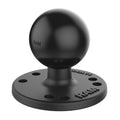
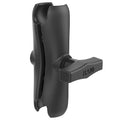
The mount. The Tough-Dock "requires a 4-hole AMPS pattern ball adapter". Use a C-size kit, as in the case study: a round plate with ball on the dock, a double socket arm and a C-size base on the console or a bracket. Check the weight of tablet, sleeve and dock against RAM's load figures in our RAM ball sizes guide.
Recommended RAM Mounts for ambulance tablets

RAM MOUNTRAM Mounts GDS Tough-Dock for Samsung Galaxy Tab S10+, S9+, S9 FE+, S8+, S7+ & S7 FE 12.4", USB-C PowerPart no. RAM-GDS-DOCK-SAM78CPU
240,28 €+VATIn stock

RAM MOUNTRAM Mounts IntelliSkin Next Gen Sleeve for Samsung Galaxy Tab S10+, S9+ & S9 FE+Part no. RAM-GDS-SKIN-SAM87-NG
148,10 €+VATAvailable on request

RAM MOUNTRAM Mounts Locking GDS Tough-Dock for Samsung Galaxy Tab S10+, S9+, S8+ & 12.4" ModelsPart no. RAM-GDS-DOCKL-SAM78CPU
284,12 €+VATAvailable on request

RAM MOUNTRAM Mounts Round Plate with Ball, AMPS Pattern, C-SizePart no. RAM-202U
24,88 €+VATIn stock

Buying for a fleet or a tender? Ask us for a quote.
Get a quote- GDS Tough-Dock: spring-loaded, charges through pogo pins.
- IntelliSkin Next Gen: pogo contacts plus its own USB-C port.
- Locking GDS Tough-Dock: "a keyed locking system", two keys.
- Round Plate with Ball, C size: fits the dock's AMPS holes.
- Double Socket Arm, C size: 5.69" (≈ 145 mm); RAM: "Standard Use: 4 lbs".
Power the dock and install it
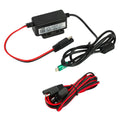
The Tough-Dock has a USB Type-C power input. RAM's Hardwire Charger Compatibility Guide lists the GDS 10-30V Power Delivery (45W) USB-C Hardwire Charger for USB-C GDS vehicle docks: 10–30 VDC in, 5–15 VDC at 3 A out. See our GDS hardwire charger guide.
Recommended RAM hardwire charger

RAM MOUNTRAM Mounts GDS Modular USB-C Power Delivery Hardwire Charger 45 W, 10–30 V InPart no. RAM-GDS-CHARGE-V3C-3U
148,10 €+VATIn stock
Buying for a fleet or a tender? Ask us for a quote.
Get a quote- Fix the base following the vehicle maker's and RAM's installation instructions.
- Have a qualified installer hardwire the charger, fused as the instructions specify: direct to the battery (always on) or to the cab fuse block (with the ignition), as RAM's diagram shows.
- Route cables clear of seat rails, pedals and moving parts.
- Test docking, and recheck the knob after the first shift.
Take the tablet to the patient and back
There is no cable to unplug: the tablet lifts out in its sleeve and charges again through the pogo pins when docked.
- A locked dock needs its key: agree where it is kept.
- Away from the dock, RAM says the sleeve's "External USB Type-C connector allows for charging capabilities when GDS Docks are not available".
- RAM lists a hand strap with kickstand and a shoulder strap for this sleeve (ask us).
- At the station, the same sleeve fits GDS desktop and multi-port docks: see station charging docks.
Lock the tablet when the vehicle is unattended
A locking dock keeps the tablet in place when the crew leaves the vehicle. To protect the mount itself, fit a Pin-Lock security knob, which RAM says "replaces all knobs on 1.5" diameter C size arms and mounts". See our RAM locking guide.
Keep contacts and sleeves clean
RAM's Cleaning Guide: IntelliSkin Tablet Pogo Pads says: "Use 70% Isopropyl Alcohol for routine maintenance and light buildup of debris." For heavy build-up or loss of connection it recommends a DeoxIT Pen, then one cleaning with isopropyl alcohol.
For the tablet and sleeve, follow the tablet maker's cleaning instructions and your service's hygiene rules. At vehicle checks, look for worn latches and loose knobs.
RAM's video covers contacts on Zebra devices and docks.
Video: RAM Mounts
Equipping several ambulances? Send us device models, vehicle types and quantities for a quote.
Frequently asked questions
What is the best tablet mount for an ambulance?
For a fleet on one tablet model, an IntelliSkin sleeve in a GDS Tough-Dock: it charges through pogo contacts, releases quickly and comes in a locking version.
Does RAM make an ePCR tablet mount?
RAM doesn't use the term. Its docks hold the tablet whatever app it runs, so choose by device model, sleeve and vehicle.
Can I mount a tablet in the ambulance patient compartment?
We found no RAM guidance for it. Secure the device so it can't come loose, and use only mounting points the vehicle builder approves.
How do I keep an ambulance tablet charged?
Use a GDS dock fed by a hardwire charger, such as RAM's 10–30 V USB-C Power Delivery charger, wired by a qualified installer.
Which RAM dock fits the Galaxy Tab S9+ or S10+?
The GDS Tough-Dock for Samsung Tab S10+, S9+, S8+ and more (or its locking version), with the IntelliSkin Next Gen sleeve for those tablets.
Was this guide helpful?
Used in this guide
Compatible consumables and accessories for the RAM Mounts GDS Tough-Dock for Samsung Galaxy Tab S10+, S9+, S9 FE+, S8+, S7+ & S7 FE 12.4", USB-C Power (RAM-GDS-DOCK-SAM78CPU).
Products used in this guide
| Product | Price | ||
|---|---|---|---|
 |
RAM Mounts GDS Tough-Dock for Samsung Galaxy Tab S10+, S9+, S9 FE+, S8+, S7+ & S7 FE 12.4", USB-C PowerRAM-GDS-DOCK-SAM78CPU | 240,28 €+VATIn stock | |
 |
RAM Mounts IntelliSkin Next Gen Sleeve for Samsung Galaxy Tab S10+, S9+ & S9 FE+RAM-GDS-SKIN-SAM87-NG | 148,10 €+VATOut of stock | View |
 |
RAM Mounts Locking GDS Tough-Dock for Samsung Galaxy Tab S10+, S9+, S8+ & 12.4" ModelsRAM-GDS-DOCKL-SAM78CPU | 284,12 €+VATOut of stock | View |
 |
RAM Mounts Round Plate with Ball, AMPS Pattern, C-SizeRAM-202U | 24,88 €+VATIn stock | |
 |
RAM Mounts Double Socket Arm, C-Size, MediumRAM-201U | 40,05 €+VATIn stock | |
 |
RAM Mounts GDS Modular USB-C Power Delivery Hardwire Charger 45 W, 10–30 V InRAM-GDS-CHARGE-V3C-3U | 148,10 €+VATIn stock |
No matching products.
Related guides
Still stuck?
Contact support
Send us your model and a short description of the problem. Our team will help you find a solution.
